Do you have this great mobile application or project that needs to read 1D/2D barcodes but do not know where to start?
Worry no more, QuickMark v3.8 Advanced Edition allows developers to take advantage of QuickMark's mobile barcode reader application and its wide range of device support for decoding and retrieval of the decoded data.
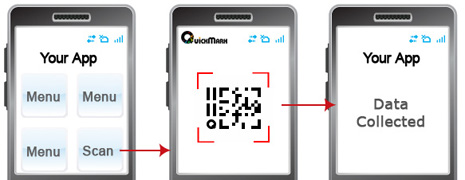
As long as the end user has QuickMark v3.8 Advanced Edition, your application will be able to wake up QuickMark when you need to decode a barcode. Once the barcode is recognized, the data will be returned to your application while QuickMark quietly closes itself.
Once you have developed your amazing application, simply download QuickMark v3.8 Standard Edition for testing or upgrade to the Advanced Edition for full capabilities.
QuickMark’s mobile barcode technology has been tested and approved by several global device manufacturers for their products and supports the most popular barcode symbologies.
It can be tough keeping up with the ever growing number of mobile devices on the market and using the QuickMark API gives you one thing less to worry about: integration with the device’s camera.
Leverage our extensive list of supported devices and instantly extend barcode support for your application to hundreds of mobile device models.
Using QuickMark's API from your application will work similar to the following fashion:
| Item | Desription |
| 2D Barcode Formats | Quick Code, QR Code, Data Matrix |
| 1D Barcode Formats* | EAN 8/13, Code 39, Code 128 |
| Platforms | Windows Mobile, Symbian S60 |
| Devices | http://www.quickmark.com.tw/En/basic/download.asp |
The Barcode SDK will allow developers to embed not only the scanning engine, but the camera view as well into their mobile application. It is a solution most suitable for mobile applications that need to frequently perform barcode scanning.
More details.